🌉 How to Bridge USDC → USDA via Astro Bridge
You can use the official Astro Bridge interface to convert USDC into USDA on AO.
Access it here: https://bridge.astrousd.com/.
🔎 1. Understanding What USDA and the Astro Bridge Do
- 💵 USDA (Astro USD) is the native stablecoin of the AO (Arweave) ecosystem — a unified asset aggregating multiple stablecoins and fiat sources into one seamless layer.
- 🌐 The Astro Bridge facilitates seamless conversion of stablecoins, including USDC, into USDA minted directly on AO via smart contracts.
- 🔗 It supports bridging from multiple source networks and assets.
🛠 2. Step-by-Step: Bridging USDC to USDA
1️⃣ Step 1: Go to the Astro Bridge Interface
Visit https://bridge.astrousd.com/ to access the live bridge tool.
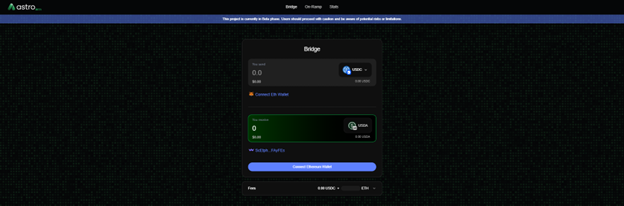
2️⃣ Step 2: Connect Your Wallets
- 🔑 Connect your Wander Wallet to receive USDA on AO.
- 💼 Connect MetaMask (or another compatible wallet) to lock USDC from supported networks (Ethereum, Base, Polygon, or Solana).
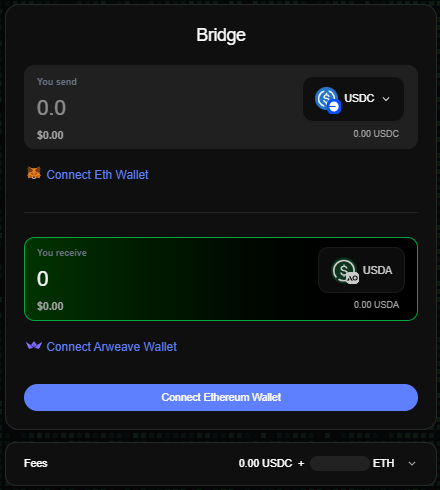
3️⃣ Step 3: Select the Source Chain & Stablecoin
Choose the blockchain where your USDC is held (Ethereum, Base, Polygon, or Solana). Then select USDC as the stablecoin to bridge.
4️⃣ Step 4: Enter the Amount
Input the amount of USDC you wish to bridge (minimum ~$5). The interface shows a real-time estimate of how much USDA you’ll receive.
5️⃣ Step 5: Confirm Transaction Details
Review all details: source chain, stablecoin, USDA estimate, and expected processing time.
6️⃣ Step 6: Approve the Transaction on MetaMask
Approve the transaction in MetaMask (or another wallet). Wait for confirmations before proceeding.
7️⃣ Step 7: Receive USDA in Wander Wallet
Once confirmed, USDA is automatically minted and delivered to your Wander Wallet on AO.
📊 3. Summary Table
| Step | Action |
|---|---|
| 1 | Visit Astro Bridge |
| 2 | Connect Wander Wallet + MetaMask |
| 3 | Select chain & stablecoin (USDC) |
| 4 | Enter amount (min $5) |
| 5 | Review details |
| 6 | Approve in MetaMask |
| 7 | Receive USDA in Wander Wallet |
ℹ️ 4. Important Notes & Sustainable Usage
- 🧪 Beta Status: The Astro Bridge is currently in Beta — use cautiously.
- 💱 Supported Assets: You can bridge USDC, USDT, DAI, or USDS from Ethereum, Base, Polygon, or Solana.
- 🔒 Security: USDA is backed 1:1 by locked collateral in protocol vaults.
🎯 5. Final Thoughts
Bridging USDC to USDA via Astro Bridge is simple:
- Visit the site.
- Connect wallets.
- Select chain & USDC.
- Enter amount.
- Approve in MetaMask.
- Receive USDA in your AO wallet.
This provides a unified liquidity experience for DeFi within the AO ecosystem. 🚀